How CVE Lite CLI Works
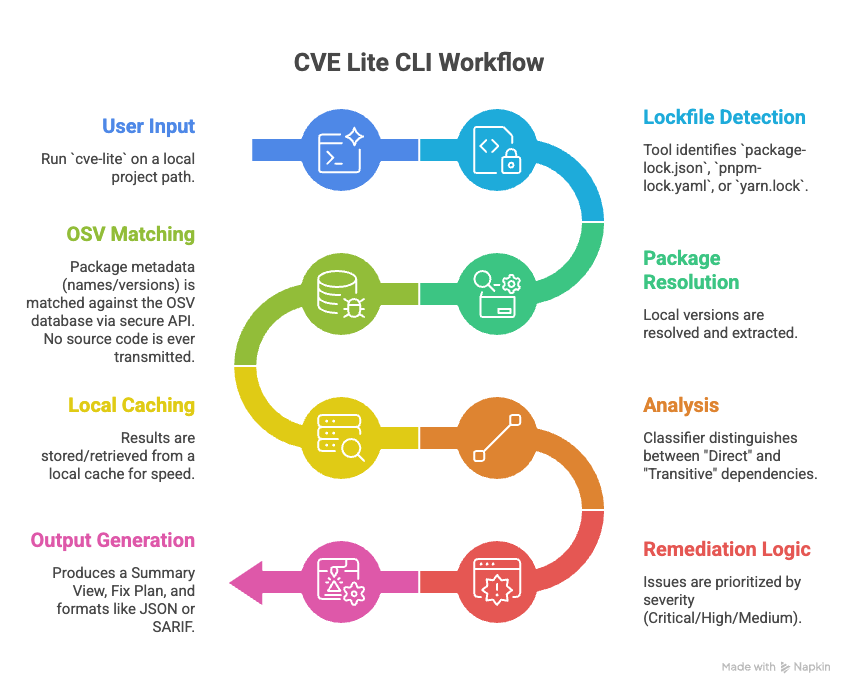
CVE Lite CLI is a local-first, metadata-only scanner. It operates directly within the developer's environment without requiring code uploads, cloud accounts, or heavy agent installations. It focuses on the moment of release — providing a fast, low-noise assessment of the dependency tree by analyzing resolved versions in project lockfiles.
Vulnerability data sources
CVE Lite CLI queries the OSV API (api.osv.dev), an open vulnerability aggregator maintained by Google. OSV is the only external query target — not because other databases are ignored, but because OSV already aggregates the databases that matter for npm packages.
Why not NVD directly? NVD's API does not support queries by package ecosystem. It uses CPE (Common Platform Enumeration) identifiers, which are vendor/product strings that don't map cleanly to npm package names. In practice, npm CVEs are reviewed and assigned version ranges by the GitHub Advisory Database (GHSA) before they reach NVD — so GHSA is the authoritative source for npm vulnerability data.
Why not GHSA directly? GHSA is a first-class data source inside OSV. OSV ingests GHSA advisories directly, so querying GHSA separately returns the same data. This was verified by comparing OSV and GHSA API results for the same package: the vast majority of vulnerability IDs returned by OSV for npm packages are GHSA IDs, and OSV includes GHSA as a first-class source for the npm ecosystem.
Freshness: There is a short window — typically minutes — between GHSA publishing an advisory and OSV reflecting it. If you need the freshest results immediately after a known disclosure, run with --no-cache to bypass the local query cache and query OSV directly — though note that the OSV ingestion window is a separate delay that --no-cache cannot overcome.
Contents
- Vulnerability data sources
- Trust boundary and privacy
- Lockfile-driven accuracy
- Direct vs transitive triage
- Remediation strategy
- Performance and caching
- Offline advisory flow
- Standards-based output
Trust boundary and privacy
The scan is non-intrusive. Only package names and exact resolved versions are extracted from your lockfile. No source code, environment variables, secrets, or proprietary logic is ever transmitted to the external OSV API.
CVE Lite CLI does not require a hosted account, cloud dashboard, or source code upload.
For the full explanation, see Security Assurance Case.
Lockfile-driven accuracy
By parsing package-lock.json, pnpm-lock.yaml, or yarn.lock, the tool avoids the "it works on my machine" discrepancy. It scans the exact dependency tree that will be deployed — not what your package.json declares, but what was actually resolved and installed.
A limited package.json fallback is also supported for exact pinned direct dependencies when no lockfile is present.
Direct vs transitive triage
The analysis engine uses the lockfile's graph structure to distinguish between:
- direct dependencies — packages you declared in your manifest
- transitive dependencies — packages brought in by your dependencies
This separation enables a "fix the root" strategy. Instead of chasing every nested vulnerable package, the tool surfaces the parent-level upgrade that resolves the underlying dependency path. In verbose mode, the full dependency path is shown so you can trace exactly how a transitive vulnerability was introduced.
Remediation strategy
CVE Lite CLI turns findings into package-manager-native commands when the available metadata supports a confident path. Direct findings use validated package upgrades. Transitive findings prefer the parent package that introduced the vulnerable dependency, including npm-specific npm update <parent> recommendations when a known non-vulnerable child version already fits within the current parent range.
See the Remediation Strategy guide for the full decision model and package-manager notes.
Performance and caching
A local cache stores advisory results so that repeated scans complete in milliseconds rather than seconds. Query results expire after 30 minutes — both clean (no vulnerabilities) and non-empty results — ensuring that newly published CVEs are picked up on the next scan after the TTL window.
OSV batch queries run in parallel with a concurrency cap of 5, reducing cold scan time significantly on large lockfiles.
See the Caching guide for TTL behaviour, false negative and false positive risk, the --no-cache flag, and CI considerations.
Offline advisory flow
Advisory data can be synced into a local SQLite database and reused for offline scans with zero runtime advisory API calls.
In a local benchmark, syncing ~217,065 advisory records improved from 87.53s to 8.84s after bulk SQLite ingestion optimizations — roughly 9.9x faster end-to-end.
See the Offline Advisory DB guide for full workflow details.
Standards-based output
Results are available in JSON format for scripted pipelines, custom reporting, and artifact storage.
Use --json for JSON output.
SARIF output is planned — see issue #179 for progress.