OWASP SecOpsTM
SecOpsTM makes threat modeling an accessible, automated, and dynamic practice integrated into modern DevSecOps workflows. It bridges the gap between complex security analysis and continuous software development by treating threat models as version-controlled code.
Based on PyTM: SecOpsTM builds on PyTM’s modeling primitives and extends them with AI enrichment, goal-driven attack scenarios (GDAF), MITRE mapping, rich reporting, and an interactive web editor.
What it does
- Define your architecture in a simple Markdown DSL (or import from Ansible / Terraform IaC).
- Run automated STRIDE threat identification via the PyTM rule engine, enriched with CAPEC, CVE, D3FEND, CIS Controls, and NIST 800-53 mappings — all from local data files, no internet required at runtime.
- Optionally call an LLM (Ollama fully offline, Gemini, OpenAI, Mistral) for component-level AI threats, with a RAG pipeline (ChromaDB + HuggingFace embeddings) for system-level cross-boundary threats.
- Generate Goal-Driven Attack Flows (GDAF) — top-down adversary simulations from attacker objectives to MITRE-technique-annotated hop chains, exported as Attack Flow
.afbfiles. - Produce HTML reports with executive summary, risk matrix, severity heat map, attack chain analysis, and GDAF scenarios.
- Export versioned JSON (schema v1.0, stable threat IDs
T-NNNN), STIX 2.1, ATT&CK Navigator layers, and Attack Flow.afbfiles. - CI/CD ready:
secopstm --stdoutpipes JSON to SIEM tools or fails a build on CRITICAL threats. - Offline-first: core analysis, AI embeddings, and all security knowledge bases work with zero network access.
Quick Start / Installation
1. Clone the repository
git clone https://github.com/ellipse2v/SecOpsTM.git
cd SecOpsTM
2. Install Python dependencies
Core installation (threat modeling, diagrams, reports — no AI features):
pip install -e .
With AI features (LLM enrichment, RAG pipeline, GDAF):
pip install -e ".[ai]"
The [ai] extra installs litellm, chromadb, and sentence-transformers. The core tool works fully offline and without these packages — AI features degrade gracefully if not installed or if no LLM provider is reachable.
Note:
pip install -e .installs in editable mode — source changes are immediately reflected without reinstalling. Usepip install .for deployment.
3. Install Graphviz (for diagram generation)
- Windows: https://graphviz.org/download/
- macOS:
brew install graphviz - Linux:
sudo apt-get install graphviz
After installation, restart your terminal or IDE so that the dot binary is on your PATH.
4. Configure AI providers (optional)
Edit config/ai_config.yaml to enable your preferred LLM provider:
ai_providers:
  - name: gemini
    enabled: true
    model: gemini/gemini-1.5-flash
    api_key_env: GEMINI_API_KEY

  - name: ollama
    enabled: false
    model: ollama/llama3
    api_base: http://localhost:11434
Set enabled: true on the provider you want to use. For cloud providers, set the corresponding API key as an environment variable (e.g., export GEMINI_API_KEY=...). Ollama runs fully offline.
5. Verify the installation
secopstm --model-file threatModel_Template/main.md
A timestamped output folder should appear in output/ with an HTML report and diagrams.
Requirements
- Python 3.8+ (Python 3.10 recommended)
- Graphviz (
dotbinary on PATH) - For AI features:
pip install -e ".[ai]"+ an LLM provider configured inconfig/ai_config.yaml
Core Analysis
- Markdown-based Threat Modeling: Define your architecture in a simple DSL — Boundaries, Actors, Servers, Dataflows, Data.
- Automated STRIDE Analysis: Detects threats for each element and flow via the PyTM rule engine.
- MITRE ATT&CK + CAPEC + D3FEND mapping: Every threat is mapped to CAPEC attack patterns, ATT&CK techniques, and D3FEND defensive countermeasures — all offline, from local data files.
- CIS Controls + NIST 800-53: Remediation suggestions linked to ATT&CK techniques via local mapping files.
- CVE correlation: CVE definitions link real vulnerabilities to CAPEC patterns and MITRE techniques.
- Severity Calculation: Multi-factor scoring — base score per STRIDE category, protocol adjustments, data classification multipliers, VOC risk signals (CVE match +0.5, high-risk CWE +0.3, network-exposed +0.7, D3FEND mitigations −0.5).
AI-Enhanced Threat Analysis
Three independent threat engines feed into a unified, deduplicated output:
| Engine | Source tag | Scope |
|---|---|---|
| PyTM rule engine | pytm |
Per element/dataflow, rule-based |
| Component-level LLM | AI |
Per component, generated by the configured LLM |
| RAG pipeline | LLM |
System-level, ChromaDB + local HuggingFace embeddings |
- Multi-provider: Ollama (fully offline), Google Gemini, OpenAI, Mistral, and any LiteLLM-compatible provider. Configured in
config/ai_config.yaml. - Offline-first: The embedding model (
all-MiniLM-L6-v2) and the vector store (ChromaDB) run locally. The only outbound traffic is the LLM API call if using a cloud provider. - Deduplication: When an AI threat and a PyTM threat cover the same (target, STRIDE category) with similar descriptions, the AI version wins — using offline Jaccard word-overlap.
- Trust context in prompts: Each component prompt includes its boundary’s trust level (
TRUSTED/UNTRUSTED). - Boundary-level AI threats: Trust boundaries are included as AI analysis targets for privilege escalation and lateral movement scenarios.
- Cross-model RAG analysis: In project mode, the RAG pipeline receives the full project context (main model + all sub-models) for cross-boundary threat detection.
- Configurable parallelism: Component-level AI enrichment runs concurrently; controlled by
max_concurrent_ai_requestsinconfig/ai_config.yaml.
Goal-Driven Attack Flows (GDAF)
GDAF is a top-down attack scenario generator that complements the bottom-up AttackChainAnalyzer. It answers: “What path would a specific adversary take to reach this objective?”
- Objective-driven: Define business-impact objectives (
OBJ-DOMAIN-COMPROMISE,OBJ-DATA-EXFIL, etc.) and threat actor profiles in a YAML context file. - Graph traversal: BFS from actor entry points to target assets across the full architecture graph.
- Per-hop MITRE techniques: Scored from
enterprise-attack.jsonusing platform match, tactic relevance, hop position, actor TTPs, and vulnerability signals (no auth, no encryption, legacy). - Risk scoring: CRITICAL ≥ 4.0 / HIGH ≥ 2.8 / MEDIUM ≥ 1.8 / LOW < 1.8.
- Output: One Attack Flow
.afbfile per scenario +gdaf_summary.json. Also rendered as a collapsible accordion in the HTML report. - Fully offline: Only reads
enterprise-attack.jsonfrom disk.
Reporting & Export
- HTML report: Executive summary (KPIs + top-5 risks), STRIDE distribution, risk matrix 5×5, severity filter, source tagging (
pytm/AI/LLM), risk signal badges (CVE,CWE⚠,NET,D3F), D3FEND mitigations. - ⛓️ Attack Chain Analysis: Multi-step attack paths chaining threats across dataflows, with severity labels.
- GDAF accordion: Goal-driven attack scenarios embedded in the HTML report as a collapsible
<details>section. - Report diff: Compare two JSON exports to track new threats
[+], resolved threats[-], and severity changes[~]— available via web UI (/diff) and CLI (secopstm --diff). - Versioned JSON export (
schema_version: "1.0"): Stable structure with threats carrying stable IDsT-NNNN. Schema validated against JSON Schema 2020-12. - STIX 2.1 bundle and ATT&CK Navigator layer (JSON).
- Attack Flow
.afbfiles for key STRIDE objectives and GDAF scenarios (compatible with the MITRE Attack Flow Builder). - Remediation Checklist: CSV export of actionable mitigations, one row per threat-technique pair.
Visual Diagrams
- Trust Boundary Colors: Trusted zones rendered green solid, untrusted zones red dashed — baked into the exported SVG.
- Severity Heat Map Overlay: Interactive toggle in HTML diagrams. Applies per-component severity colour (CRITICAL → red, HIGH → orange, MEDIUM → yellow, LOW → teal); hover tooltip links directly to the threat report.
- Sub-model Drill-down: Server nodes with a
submodel=reference become hyperlinks in the parent diagram. Clicking opens the child diagram showing internal architecture plus a ghost cluster of external connections (“External connections in” / “External connections out”).
CLI & CI Integration
secopstmcommand installed viapip install -e .:secopstm --model-file model.md # Full analysis secopstm --model-file model.md --stdout # JSON on stdout secopstm --model-file model.md --output-format json --output-file report.json secopstm --model-file model.md --output-format stix secopstm --diff old_report.json new_report.json # Compare two reports secopstm --server # Launch web editor
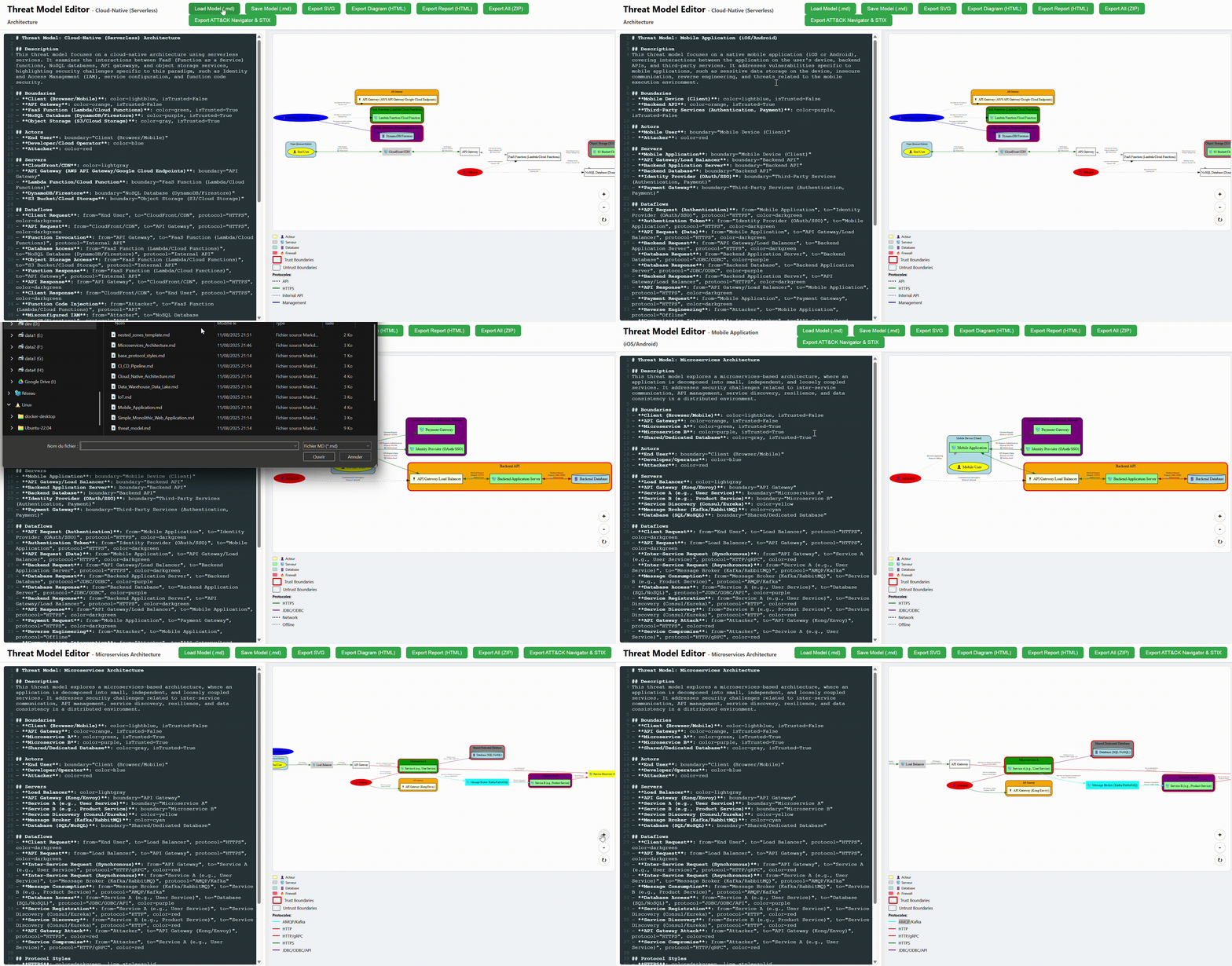
Interactive Web Editor
- Real-time Editing: Live diagram preview that updates as you type.
- DSL Validation: Automatic structural validation banner — red on errors, orange on warnings.
- Severity Heat Map: Toggle applies colour-coded severity overlay; tooltip links to the threat report anchor.
- Project Mode: Tabbed interface for multi-file projects; “Generate All” produces unified, cross-linked reports.
- 📂 Load Project: Directory picker automatically reads all
.mdfiles into tabs and detectsBOM/andcontext/subdirectories — badges appear and files are sent automatically on generation. - Graphical Editor: Full drag-and-drop canvas for building models without writing Markdown.
Extensibility
- PyTM Compatibility: Supports PyTM’s model structure and can be extended with PyTM’s features.
- IaC Plugins: Ansible (inventory + playbook parsing). Terraform plugin available (
TerraformPlugin) covering 50+ AWS, Azure, and GCP resource types. - Custom MITRE Mappings: Override or extend the built-in CAPEC→ATT&CK mapping via
## Custom Mitre Mappingin the DSL. - BOM (Bill of Materials): Per-asset YAML files (
BOM/{asset}.yaml) carrying OS version, known CVEs, patch level, and detection level — used to boost CVE scoring and calculate detection coverage in GDAF. - All mappings and calculations are modular and easy to override.
Command Line Interface (CLI)
After installing with pip install -e ., the secopstm command is available. You can also use python -m threat_analysis — they are 100% equivalent.
Basic usage
# Full analysis — HTML + JSON + SVG + ATT&CK Navigator in output/
secopstm --model-file path/to/model.md

# JSON only, printed to stdout — ideal for CI pipelines and SIEM ingestion
secopstm --model-file model.md --stdout

# JSON to a specific file
secopstm --model-file model.md --output-format json --output-file report.json

# STIX 2.1 bundle only
secopstm --model-file model.md --output-format stix

# Include Attack Flow .afb files for key STRIDE objectives
secopstm --model-file model.md --attack-flow

# Launch the web editor
secopstm --server

# Launch with a specific model pre-loaded
secopstm --server --model-file path/to/model.md

# Launch with an entire project
secopstm --server --project path/to/my_project/
Output artifacts
Every run generates a timestamped folder in output/ containing:
| File | Description |
|---|---|
stride_mitre_report.html |
HTML report with executive summary, risk matrix, attack chains, GDAF scenarios |
mitre_analysis.json |
Versioned JSON export (schema_version: "1.0", threats with stable IDs T-NNNN) |
tm_diagram.svg |
Architecture diagram with trust boundary colors |
tm_diagram.html |
Interactive HTML diagram with severity heat map toggle |
attack_navigator_layer_*.json |
MITRE ATT&CK Navigator layer |
stix_report_*.json |
STIX 2.1 bundle |
remediation_checklist.csv |
Actionable mitigations per threat-technique pair |
afb/*.afb |
Attack Flow files for key STRIDE objectives (with --attack-flow) |
gdaf/ |
GDAF attack scenario .afb files (when a context YAML is present) |
Comparing reports (diff)
secopstm --diff old_report.json new_report.json
Output (one line per difference, suitable for CI):
[+] T-0042 HIGH   SQL Injection on DatabaseServer (Tampering)
[-] T-0017 MEDIUM Unencrypted traffic on API Gateway (Information Disclosure)
[~] T-0005 LOW → HIGH Privilege escalation on WebServer (Elevation of Privilege)
Project Mode: Hierarchical Threat Models
For complex projects with multiple nested threat models, organize a directory with a main.md at the root and sub-models in sub-directories. The recommended workflow uses the web UI; the CLI mode is also available:
secopstm --server --project path/to/my_project/
Or from CLI only:
python -m threat_analysis --project path/to/my_project/
Sub-models are linked from main.md using the submodel= attribute on a server definition:
## Servers
- **Backend Services**: boundary="Internal", submodel=backend/model.md
The parent diagram renders Backend Services as a hyperlink. The child diagram shows its internal architecture plus ghost nodes for external connections from the parent.
IaC Integration (Ansible)
Generate a complete threat model directly from an Ansible playbook:
secopstm --ansible-path path/to/playbook.yml
The generated Markdown model is saved in output/ and processed immediately.
CVE-Based Scoring (Optional)
Create a cve_definitions.yml in the model directory:
WebServer:
  - CVE-2021-44228   # Log4Shell
DatabaseServer:
  - CVE-2022-5678
The tool automatically loads this file. CVEs are mapped to CAPEC attack patterns and influence STRIDE threat severity scoring.
REST API (JSON export)
The /api/export_json endpoint returns the versioned JSON report without generating files — ideal for SIEM connectors:
# Count CRITICAL threats — fail the CI build if any are present
CRITICAL=$(curl -s -X POST http://localhost:5000/api/export_json \
  -H "Content-Type: application/json" \
  -d '{"markdown_content": "..."}' | jq '[.threats[] | select(.severity=="CRITICAL")] | length')

if [ "$CRITICAL" -gt 0 ]; then
  echo "Build blocked: $CRITICAL CRITICAL threat(s) found."
  exit 1
fi
Web-based User Interface (Server Mode)
The interactive web editor runs on a local server and offers two distinct modes:
# Start with an empty editor
secopstm --server

# Start with a specific model pre-loaded
secopstm --server --model-file path/to/model.md

# Start with an entire project (recommended for multi-model work)
secopstm --server --project path/to/my_project/
Open http://127.0.0.1:5000 in your browser. A central menu lets you choose between two modes.

Simple Mode
An interface for editing and visualizing threat models described in Markdown.
Features
- Monaco editor with syntax highlighting and DSL validation — a banner below the editor updates 800 ms after each keystroke, turning red on structural errors and orange on warnings.
- Live diagram preview: The architecture diagram updates in real time as you type.
- Tabbed interface: When a project is loaded, every model file opens in its own tab.
- Sub-model navigation: Server nodes with a
submodel=reference are clickable hyperlinks in the diagram, navigating to the child model’s diagram. - Severity heat map toggle: Applied in the diagram HTML — colour-codes each component by its highest threat severity. Hovering shows a tooltip with the severity level and a deep link to the threat report.
Project workflow
- Launch the server with
--project path/to/projectto open all models automatically. - Or click “📂 Load Project” in the browser to use a directory picker:
- All
.mdfiles are opened into editor tabs. BOM/andcontext/subdirectories are detected automatically.- BOM ✓ and Context ✓ badges appear next to the button when found.
- All
- Click “Generate All” to produce the full unified, cross-linked report for the project. BOM and context files are sent to the server automatically — no manual path configuration required.
Generate All
The “Generate All” button produces a complete artifact bundle:
- HTML report (with attack chains, GDAF scenarios, severity heat map)
- Versioned JSON export
- SVG diagram (trust boundary colors) + interactive HTML diagram
- STIX 2.1 bundle + ATT&CK Navigator layer
- Attack Flow
.afbfiles - GDAF attack scenarios (when a context YAML is present)
Graphical Editor
A full-featured canvas for building threat models visually — no Markdown required.
- Drag-and-drop toolbar: add Actors, Servers, Boundaries, Dataflows.
- Properties panel: edit element attributes directly.
- Export all artifacts without writing a single line of DSL.
Report Diff Page (/diff)
Compare two versioned JSON exports in the browser:
- Open
http://127.0.0.1:5000/diff. - Paste or upload two JSON report files (older on the left, newer on the right).
- The page shows counts by category and a line per difference:
[+]New threats introduced[-]Threats resolved or removed[~]Threats whose severity changed
Threat Model DSL
Threat models are defined in a simple Markdown DSL. Each section corresponds to an architectural concept. The parser is 2-pass: elements first, then relationships.
Minimal example
# Threat Model: My Application

## Description
A web application with a backend database.

## Boundaries
- **Internet**: is_trusted=False, color=lightcoral
- **Internal**: is_trusted=True, color=lightgreen

## Actors
- **User**: boundary=Internet

## Servers
- **WebApp**: boundary=Internet, internet_facing=True
- **Database**: boundary=Internal

## Data
- **User Credentials**: classification=confidential, lifetime=long_lived

## Dataflows
- **User to WebApp**: from="User", to="WebApp", protocol="HTTPS", is_encrypted=True, is_authenticated=True
- **WebApp to Database**: from="WebApp", to="Database", protocol="PostgreSQL", data="User Credentials", is_encrypted=True

## Protocol Styles
- **HTTPS**: color=darkgreen, line_style=solid
- **PostgreSQL**: color=royalblue, line_style=dashed

## Severity Multipliers
- **Database**: 2.0
DSL Section Reference
## Boundaries
| Attribute | Description | Default |
|---|---|---|
is_trusted |
Trusted zone (green solid) or untrusted (red dashed) | True |
color |
Fill color in diagrams | none |
traversal_difficulty |
GDAF hop cost: low (+0.3), medium (+0.1), high (+0.0) |
medium |
boundary |
Parent boundary name (for nested zones) | none |
## Actors
| Attribute | Description |
|---|---|
boundary |
Which boundary this actor lives in |
color |
Node color in diagrams |
## Servers
| Attribute | Description |
|---|---|
boundary |
Which boundary this server lives in |
submodel |
Relative path to a child model file (e.g., submodel=backend/model.md) |
entry_point |
True — marks this server as the entry point for sub-model ghost connections |
internet_facing |
True — marks server as a potential GDAF entry point even in a trusted boundary |
credentials_stored |
True — signals credential-access vulnerability boost in GDAF |
color |
Node color in diagrams |
## Data
| Attribute | Description | Values |
|---|---|---|
classification |
Data sensitivity | public, restricted, sensitive, confidential, top_secret |
lifetime |
Data retention | transient, short_lived, long_lived, bound_to_subject |
credentialsLife |
Credential lifetime | short, long, none |
## Dataflows
| Attribute | Description |
|---|---|
from, to |
Source and destination element names |
protocol |
Protocol label (e.g., HTTPS, gRPC, SSH) |
data |
Name of a ## Data element carried on this flow |
is_encrypted |
True / False |
is_authenticated |
True / False |
bidirectional |
True — models traffic in both directions |
## Context (optional, for GDAF and BOM)
## Context
- gdaf_context = context/threat_context.yaml
- bom_directory = BOM/
Sub-model Drill-down
A server node can reference a child model file:
## Servers
- **Backend Services**: boundary="DMZ", submodel=backend/model.md, entry_point=False
## Servers
- **API Gateway**: boundary="DMZ", entry_point=True
The parent diagram renders Backend Services as a hyperlink to the child diagram. The child diagram shows the server’s internal architecture plus a “ghost” cluster of external connections from the parent:
- External connections in (parent model) — traffic arriving from the parent
- External connections out (parent model) — traffic leaving to the parent
Use entry_point=True on the server in the child model that receives external traffic. This tells the diagram generator which node to wire the ghost connections to.
Protocol Styles and Legends
Define protocol styles to control diagram colors and make protocols appear in the legend:
## Protocol Styles
- **HTTPS**: color=darkgreen, line_style=solid
- **HTTP**: color=red, line_style=solid
- **SSH**: color=steelblue, line_style=dashed
- **gRPC**: color=purple, line_style=dotted
Protocols used in dataflows but not defined here are drawn with a default style and do not appear in the legend.
BOM (Bill of Materials)
Per-asset YAML files in a BOM/ subdirectory carry operational data that enriches threat scoring:
# BOM/WebApp.yaml
asset_name: WebApp
os: Ubuntu 22.04
patch_level: current
known_cves:
  - CVE-2023-44487    # HTTP/2 Rapid Reset
detection_level: medium   # low / medium / high
BOM known_cves are added to the CVE scoring pipeline, influencing threat severity. detection_level is used to calculate GDAF detection coverage.
GDAF Context YAML
For goal-driven attack scenario generation, provide a context file referenced from ## Context:
attack_objectives:
  - id: OBJ-DATA-EXFIL
    name: "Customer Data Exfiltration"
    business_impact: "GDPR breach, financial loss"
    target_asset_names: ["Database"]
    target_types: ["database"]

threat_actors:
  - id: TA-EXTERNAL
    name: "External Attacker"
    sophistication: intermediate
    entry_preference: internet-facing
    known_ttps: ["T1190", "T1059"]

risk_criteria:
  max_hops: 6
  max_paths_per_objective: 3
Custom MITRE Mapping
Override or extend the built-in CAPEC→ATT&CK mapping:
## Custom Mitre Mapping
- **Protocol Tampering**: tactics=["Impact", "Defense Evasion"], techniques=[{"id": "T1565", "name": "Data Manipulation"}]
Templates
Ready-to-use model templates are available in threatModel_Template/:
| Template | Description |
|---|---|
main.md |
Simple single-model example |
projects/example_1/ |
Basic two-tier web app |
projects/example_2/ |
E-commerce platform with sub-models |
projects/example_3/ |
DMZ + backend cluster (HA pair) |
projects/example_4/ |
Payment processing platform (GDAF + BOM) |
projects/On-Prem_Enterprise_Network/ |
Large on-premise enterprise network |
Report Artifacts
Every analysis run generates a timestamped folder in output/ containing:
HTML Report (stride_mitre_report.html)

The HTML report includes:
- Executive Summary: Total threats, CRITICAL / HIGH / MEDIUM / LOW counts, top-5 risks by score, STRIDE distribution chart.
- Risk Matrix: 5×5 likelihood × impact heat map.
- Severity Filter: Interactive buttons to filter threats by severity level.
- Threat Table: One row per threat with ID (
T-NNNN), description, target, STRIDE category, source tag (pytm/AI/LLM), severity badge, MITRE techniques, D3FEND countermeasures, CIS controls, NIST 800-53 controls, and risk signal badges (CVE,CWE⚠,NET,D3F). - ⛓️ Attack Chain Analysis: Multi-step attack paths chaining threats across dataflows, showing entry point → pivot → target with severity and score.
- Goal-Driven Attack Scenarios (GDAF): Collapsible accordion showing adversary simulations from objectives to hop-by-hop MITRE techniques (only present when a context YAML was provided).
- Severity Calculation Explained: Methodology and scoring weights.
Architecture Diagrams
tm_diagram.svg: Architecture diagram with trust boundary colors:- Trusted zones: green solid border (
#2e7d32) - Untrusted zones: red dashed border (
#c62828)

- Trusted zones: green solid border (
tm_diagram.html: Interactive HTML diagram with:- Severity heat map toggle: Colours each node by its highest threat severity. Hover to see severity + a link to the threat anchor in the HTML report.
- Protocol legend with colour coding.
- Sub-model hyperlinks (click a server with
submodel=to drill down).
JSON Export (mitre_analysis.json)
Versioned JSON (schema_version: "1.0") with stable threat IDs (T-NNNN):
{
  "schema_version": "1.0",
  "analysis_date": "2026-03-21T10:00:00",
  "model_name": "My Application",
  "threats": [
    {
      "id": "T-0001",
      "description": "SQL injection on Database",
      "target": "Database",
      "stride_category": "Tampering",
      "severity": "HIGH",
      "score": 7.8,
      "source": "AI",
      "mitre_techniques": [{"id": "T1190", "name": "Exploit Public-Facing Application"}],
      "d3fend_mitigations": ["D3-SQLCA"],
      "risk_signals": {"cve_match": true, "network_exposed": true}
    }
  ]
}
Schema validated against threat_analysis/schemas/v1/threat_model_report.schema.json. Stable IDs enable SIEM deduplication and CI gate comparisons.
Other Exports
| File | Description |
|---|---|
attack_navigator_layer_*.json |
ATT&CK Navigator layer — import at attack.mitre.org/versions/v15/navigator/ |
stix_report_*.json |
STIX 2.1 bundle with threat objects and extension extension-definition--fb9c968a-... |
remediation_checklist.csv |
One row per threat-technique pair: target, STRIDE, technique, CIS control, NIST control |
afb/*.afb |
Attack Flow files for key STRIDE objectives (with --attack-flow) |
gdaf/<objective>/<actor>.afb |
GDAF attack scenario files, one per scenario |
gdaf/gdaf_summary.json |
All GDAF scenarios in a single JSON summary |
Project Mode
For multi-model projects, a unified navigable HTML report is generated at the root of the output folder. Sub-model reports are in corresponding sub-directories, with all links adjusted automatically.

MITRE ATT&CK Navigator Integration

Roadmap
Recently Completed ✅
- AI threat enrichment — LiteLLM + RAG pipeline (ChromaDB + HuggingFace embeddings), fully offline with Ollama.
- Goal-Driven Attack Flows (GDAF) — top-down adversary simulation from objectives to MITRE-technique-annotated hop chains, exported as Attack Flow
.afbfiles. - Attack Chain Analysis — bottom-up multi-step attack path identification across dataflows.
- Trust Boundary Colors — trusted (green) / untrusted (red) boundary rendering baked into SVG exports.
- Severity Heat Map — interactive toggle in HTML diagrams with per-component colour coding and report deep-links.
- Sub-model Drill-down —
submodel=attribute on servers; parent/child diagram navigation with ghost connections. - Versioned JSON Schema (
schema_version: "1.0", stable IDsT-NNNN) — validated against JSON Schema 2020-12. - Report Diff — compare two JSON exports via web UI (
/diff) or CLI (secopstm --diff). secopstmCLI —--output-format,--stdout,--diffflags;pip install -e ".[ai]"for AI extras.- BOM (Bill of Materials) — per-asset YAML files feeding CVE scoring and GDAF detection coverage.
- Terraform IaC plugin — 50+ AWS, Azure, and GCP resource types.
- CVE + CWE scoring — VOC risk signals adjusting STRIDE base severity.
- Parallel AI enrichment — configurable concurrency per component.
In Progress 🔄
- Terraform CLI integration — the
TerraformPluginis implemented; CLI flag (--terraform-path) is pending. - Integration tests for Attack Flow generator — current coverage is thin.
- Unit tests for
AttackChainAnalyzer,ThreatConsolidator, andReportSerializer.
Planned 📋
- CloudFormation IaC plugin — AWS CloudFormation template parsing.
- Kubernetes / Helm IaC plugin — workload and network policy parsing.
- Threat model diff in the web UI — visual side-by-side comparison with component highlighting.
- ML-enhanced threat identification — using embeddings to predict threats for novel architectures not covered by PyTM rules.
- Fine-tuned LLM — domain-specific model fine-tuned on STRIDE + MITRE data for higher accuracy without RAG.
- GDAF integration tests — automated coverage for the full GDAF pipeline.
- Multi-user web UI — authentication and project isolation for team use.
Tooling Scripts
Scripts in the tooling/ directory handle one-time data acquisition, transformation, and quality assurance. They are not part of the runtime — all artifacts they produce are committed to the repository so that the tool works fully offline without running them again.
build_vector_store.py
Purpose: Builds the ChromaDB vector store used by the RAG threat generation pipeline.
Process:
- Loads all security knowledge from
threat_analysis/external_data/(CAPEC XML, ATT&CK JSON, CVE JSONL, D3FEND CSV, CIS XLSX, NIST XLSX). - Splits documents with
RecursiveCharacterTextSplitter. - Generates embeddings with
HuggingFaceEmbeddings(all-MiniLM-L6-v2— runs locally, no API key needed). - Persists the vector store to
threat_analysis/vector_store/.
Usage: Run once after cloning, or after updating any external_data/ files. Requires pip install -e ".[ai]".
python tooling/build_vector_store.py
build_stride_capec_mapping.py
Purpose: Builds stride_to_capec.json — maps STRIDE categories to CAPEC attack pattern IDs.
Process: Applies manual corrections and supplemental mappings from hardcoded dictionaries, then writes to threat_analysis/external_data/stride_to_capec.json.
Usage: Run when the STRIDE→CAPEC mapping needs to be updated.
capec_to_mitre_builder.py
Purpose: Creates capec_to_mitre_structured_mapping.json — bridges CAPEC patterns to MITRE ATT&CK techniques.
Process:
- Downloads CAPEC data in CSV format from
mitre.org. - Parses CSV to extract CAPEC ID, name, and linked ATT&CK techniques.
- Falls back to web scraping if CSV is incomplete.
- Adds hardcoded manual mappings.
- Saves to
threat_analysis/external_data/.
Usage: Run periodically to keep the mapping current.
capec_mitre_parser.py
Purpose: Ad-hoc web scraper for researching specific CAPEC entries and MITRE ATT&CK techniques.
Usage: Research and verification tool — not part of the automated pipeline.
cis_controls_parser.py
Purpose: Parses the CIS Controls v8 to MITRE ATT&CK mapping Excel file into cis_to_mitre_mapping.json.
Usage: Run if the source Excel file (CIS_Controls_v8_to_Enterprise_ATTCK_v82_Master_Mapping__5262021.xlsx) is updated.
download_attack_data.py
Purpose: Downloads the CAPEC CSV (CAPEC_VIEW_ATT&CK_Related_Patterns.csv) from capec.mitre.org.
Usage: Data acquisition — run when updating the CAPEC data source.
download_nist_data.py
Purpose: Downloads nist800-53-r5-mappings.xlsx from the Center for Threat-Informed Defense GitHub repository.
Usage: Run when the NIST 800-53 mapping needs to be refreshed.
copy_cve_data.py
Purpose: Copies the CVE-to-CAPEC database from an external CVE2CAPEC repository into threat_analysis/external_data/cve2capec/.
Usage: Run after cloning the CVE2CAPEC repository next to the SecOpsTM directory.
validate_capec_json.py
Purpose: Quality assurance — validates the local stride_to_capec.json against the official MITRE CAPEC website.
Process: Scrapes official CAPEC pages and compares descriptions with the local JSON, printing a mismatch report.
Usage: Run after build_stride_capec_mapping.py to detect data drift.
generate_attack_flow.py
Purpose: Helper library for constructing .afb files compatible with the Attack Flow Builder.
Usage: Used internally by AttackFlowGenerator and AttackFlowBuilder. Does not perform analysis on its own.
test_rag_generation.py
Purpose: Manual smoke test for the RAG pipeline — queries the vector store and calls the configured LLM to verify end-to-end threat generation.
Usage: Run after building the vector store and configuring an LLM provider, to verify the RAG chain works.
python tooling/test_rag_generation.py