OWASP DockSec













DockSec
AI-powered Docker security scanner that explains vulnerabilities in plain English
What is DockSec?
DockSec is an OWASP Lab Project that bridges the gap between complex security scan results and actionable developer fixes. It integrates industry-standard scanners (Trivy, Hadolint, Docker Scout) with advanced AI to provide context-aware security analysis.
Instead of overwhelming you with a list of 200+ CVEs, DockSec:
- Prioritizes what actually affects your specific container setup.
- Explains vulnerabilities in plain English, not just security jargon.
- Suggests specific, line-by-line fixes for your Dockerfile.
- Generates professional, interactive security reports for your team.
Think of it as having a security expert sitting right next to you, reviewing your Dockerfiles in real-time.
How It Works
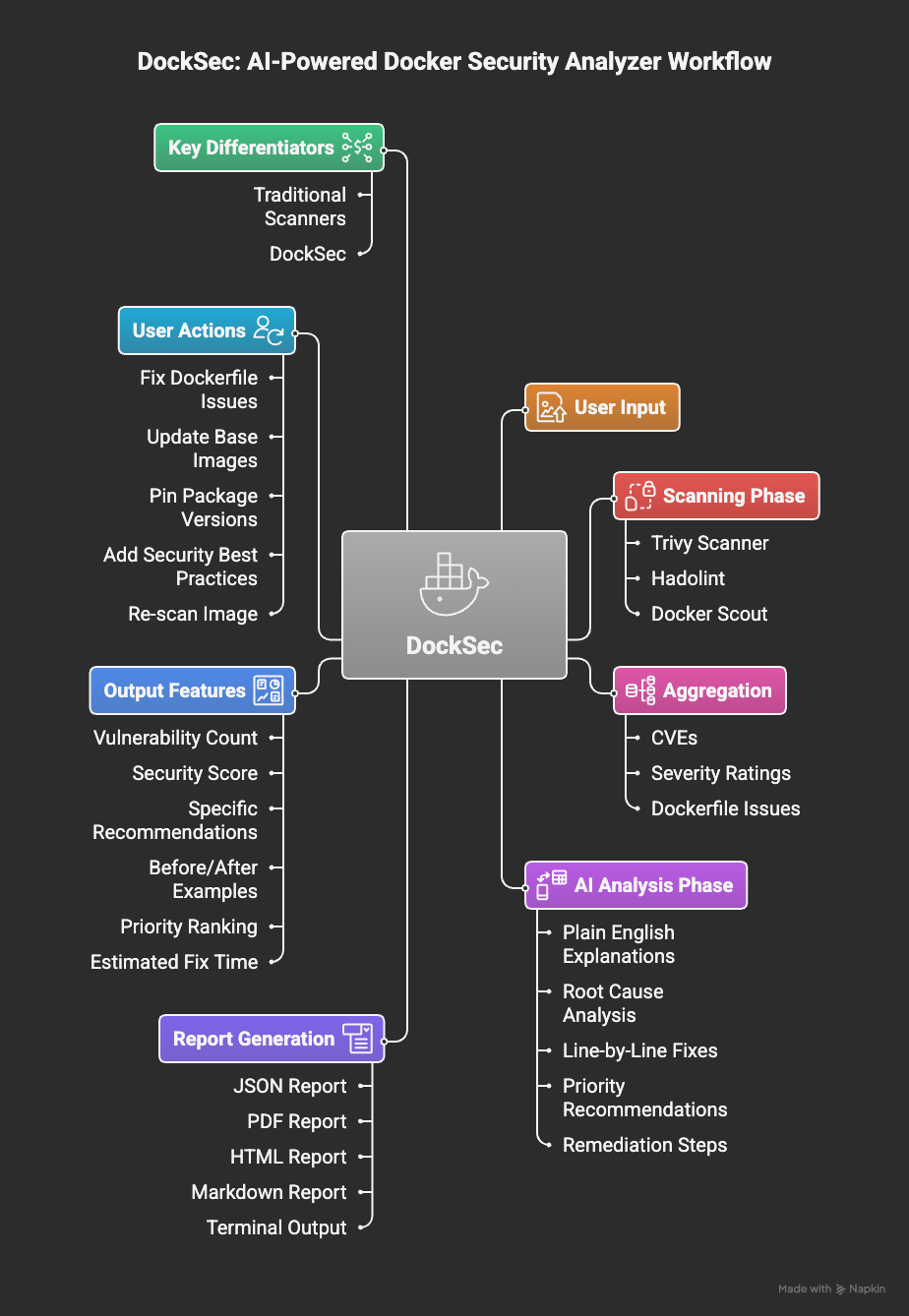
DockSec workflow: From scanning to actionable insights
DockSec follows a robust four-stage pipeline:
- Scan: Runs Trivy, Hadolint, and Docker Scout locally on your environment.
- Analyze: AI correlates findings across all scanners to remove noise and assess real-world impact.
- Recommend: Generates human-readable explanations and specific remediation steps.
- Report: Exports actionable results in JSON, PDF, HTML, or Markdown formats.
Features
- Smart Analysis: AI explains what vulnerabilities mean for your specific setup.
- Multi-LLM Support: Use OpenAI, Anthropic Claude, Google Gemini, or local models via Ollama.
- Deep Integration: Combines Trivy (vulnerabilities), Hadolint (linting), and Docker Scout.
- Security Scoring: Get a 0-100 score to track your security posture over time.
- Rich Reporting: Professional exports in HTML (interactive), PDF, JSON, and CSV.
- CI/CD Ready: Designed for easy integration into GitHub Actions and build pipelines.
- GitHub Action: Available on the GitHub Marketplace for automated security scans.
Community and Social Media
- OWASP Project Page: owasp.org/DockSec/
- OWASP Slack: #project-docksec
- PyPI: pypi.org/project/docksec/
- Issues: Report a bug
Built with ❤️ by Advait Patel and the OWASP community.
Leadership
Project Leadership
Current Leaders

Advait Patel - Creator & Project Lead


Arkadii Yakovets - Mentor
Getting Started with DockSec
Follow these steps to start securing your Docker environments with AI-powered insights.
Prerequisites
- Python 3.12+
- Docker (required for image scanning)
- API Key (Optional, for AI features. Supports OpenAI, Anthropic, Google, and Ollama)
Installation
# Install via pip
pip install docksec

# Install external scanners (Trivy and Hadolint)
python -m docksec.setup_external_tools
Basic Usage
GitHub Action
Integrate DockSec into your GitHub Actions workflow:
- name: Run DockSec AI Scanner
  uses: OWASP/DockSec@main
  with:
    dockerfile: 'Dockerfile'
    openai_api_key: $
CLI Usage
1. Scan a Dockerfile
Analyze a Dockerfile for security best practices and common misconfigurations.
docksec Dockerfile
2. Full Analysis (Dockerfile + Image)
Combine static Dockerfile analysis with dynamic image vulnerability scanning.
docksec Dockerfile -i myapp:latest
3. Image-Only Scan
Scan a Docker image without needing the original Dockerfile.
docksec --image-only -i nginx:latest
AI Configuration
To enable AI-powered explanations and remediation steps, set your preferred provider’s API key:
# For OpenAI (Default)
export OPENAI_API_KEY="your-key-here"

# For Anthropic Claude
export ANTHROPIC_API_KEY="your-key-here"
export LLM_PROVIDER="anthropic"
# Note: Defaults to claude-haiku-4-5 (cheapest/fastest)

# For Google Gemini
export GOOGLE_API_KEY="your-key-here"
export LLM_PROVIDER="google"
Generating Reports
DockSec automatically generates professional reports in multiple formats (HTML, PDF, JSON, CSV) for every scan.
By default, all reports are saved to:
~/.docksec/results/
You can override this location using an environment variable:
export DOCKSEC_RESULTS_DIR="/path/to/your/reports"
Quick Scan (No AI)
If you want a lightning-fast scan without AI analysis:
# Scan only the Dockerfile
docksec Dockerfile --scan-only

# Scan only an image
docksec --image-only -i nginx:latest
Announcements
DockSec is now an OWASP Lab Project!
We are thrilled to announce that DockSec has been officially accepted as an OWASP Lab Project. This milestone marks a significant step in our mission to make container security accessible and actionable for developers worldwide.
Recent Updates
- v2026.7.5 Released: Full support for multi-LLM analysis and professional reporting.
- 29,000+ Downloads: Growing community of security-conscious developers.
- New Documentation: Updated guides for CI/CD integration.
Stay tuned for more updates as we continue to evolve DockSec!